Quick answer: how do you verify a crypto website before connecting?
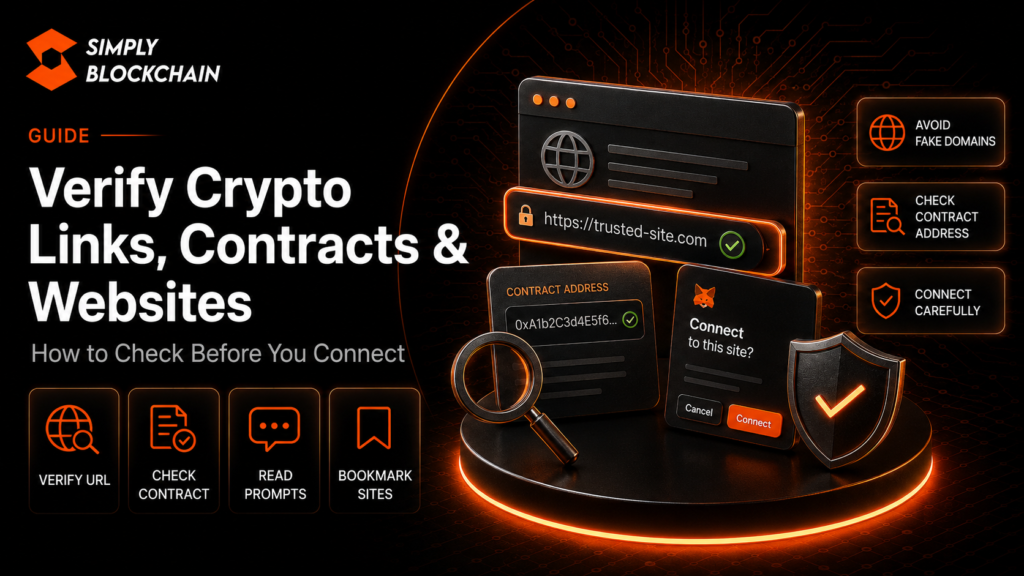
Before connecting a wallet, verify the crypto link, domain and contract independently. Start from the project’s official channels or a trusted bookmark, read the full web address carefully, confirm the token or smart-contract address from more than one reliable source where practical, and make sure the wallet prompt matches the action you intended to perform.
Do not treat a polished website, familiar logo, verified social account or top search result as proof on its own. Phishing sites are designed to look convincing.
The goal is not to become a smart-contract auditor. It is to build a repeatable verification routine that catches obvious impersonation, wrong-network mistakes and suspicious wallet requests before they become expensive.
On this page
Why crypto links need extra scrutiny
In traditional online banking, a fraudulent website may try to steal a username and password. In crypto, a malicious website can also ask a connected wallet to sign transactions, grant token approvals or expose sensitive recovery information.
The UK’s National Cyber Security Centre warns that modern phishing attempts increasingly impersonate trusted organisations and may use convincing design, messages, adverts or QR codes. Crypto users face the same techniques with the added risk of wallet interactions.
Start from the official source, not the first link you see
If you are looking for a protocol, bridge, wallet or token claim, begin with a source you can independently trust. That might be a bookmark you created previously, the project’s official documentation or a well-established profile you already verified.
Be careful with:
- sponsored search results;
- links in social-media replies;
- Telegram and Discord direct messages;
- QR codes inside unsolicited emails;
- shortened URLs that hide the destination;
- sites reached through fake support conversations.
When in doubt, navigate manually rather than following the link that created the urgency.
Read the entire domain name
Phishing domains often rely on visual similarity. Attackers may add or remove one character, swap letters, use a different domain extension or add a trusted brand name as a subdomain.
For example, a URL containing a legitimate project name somewhere in the address does not prove the site belongs to that project. The registered domain itself matters.
Check the domain before connecting and check it again before signing a high-value transaction. Bookmark verified sites you use regularly so you do not need to search for them every time.
HTTPS is not proof that a crypto site is legitimate
The padlock and HTTPS indicate that traffic between your browser and the website is encrypted. They do not prove the business, token or dapp itself is genuine.
Scam websites can obtain HTTPS certificates too. Treat encryption as a basic web requirement, not a trust badge.
Use wallet security alerts as an extra layer
MetaMask’s current security alerts guidance explains that its protection systems can use signals such as known phishing domains, suspicious contract behaviour, impersonation patterns and on-chain activity.
If a wallet identifies a site or transaction as malicious, stop rather than overriding the warning just because a social post says the site is safe.
At the same time, the absence of a warning is not proof of safety. New attacks may not yet be classified.
Verify the token contract, not just the ticker
Token names and symbols are easy to copy. Multiple tokens can use the same ticker, and scam tokens often imitate popular projects.
A token contract address is the more precise identifier for an on-chain asset. MetaMask’s contract-address guidance recommends using block explorers or established token information services to locate the correct address.
A simple contract verification routine
- Find the contract address from the project’s official documentation or website.
- Open the relevant block explorer for the correct network.
- Search the exact address.
- Compare token name, network, supply information and project references where available.
- Cross-check against another trusted source if the transaction is important.
Do not copy a contract address from a random social reply simply because it has many likes.
Contract verification on a block explorer
Block explorers such as Etherscan provide information about deployed smart contracts. Etherscan’s contract verification documentation explains that verified source code allows the compiled code to be matched with the code deployed on-chain and gives the public more transparency into the contract.
A verified contract is useful information, but it is not a guarantee that the contract is safe or that you are using the correct project. Verification tells you that source code has been published and matched; it does not replace security review or project verification.
Check the network as well as the address
The same-looking asset can exist across multiple networks, and contracts differ by chain. Make sure you are looking at the correct explorer and the network your wallet is currently using.
Wrong-network mistakes can lead to failed transactions, unexpected assets or interaction with a completely different contract than the one you intended.
Our swaps, gas, slippage and bridges guide explains network selection in more detail.
Read what the wallet is asking you to sign
The website is only one side of the interaction. The wallet prompt is the final instruction that actually matters.
Before confirming, ask:
- Which account is signing?
- Which network is active?
- Is this a connection request, message signature, approval or transaction?
- Which token is involved?
- Which spender or contract is receiving permission?
- What amount can be spent?
- Does the transaction simulation show assets leaving the wallet?
- Does this match the button I clicked on the website?
If the site says “verify wallet” but the wallet asks for unlimited token access, cancel and investigate.
Check contract addresses before token approvals
Token approvals are normal for many dapps, but the approved spender matters. MetaMask recommends reviewing the contract address shown in an approval and verifying its legitimacy using a block explorer.
When possible, compare the spender against the project’s official documentation rather than relying on the name shown by the interface.
Be suspicious of “wallet validation” language
Scam websites often use invented technical problems to justify unusual requests. Phrases such as these should trigger caution:
- validate your wallet;
- rectify your wallet;
- synchronise your node;
- restore the dapp connection;
- upgrade your wallet manually;
- enter your recovery phrase to continue.
A legitimate dapp connection does not require you to type a seed phrase into the website.
Verify support channels independently
When something goes wrong, users often search for support and become more vulnerable because they are already stressed. Scammers create fake help accounts specifically for this moment.
Navigate to the project’s official support documentation yourself. Do not trust an unsolicited direct message that appears immediately after you post a question publicly.
Never provide a seed phrase or private key to support. Our crypto scams and phishing guide covers fake-support tactics in more detail.
Check social announcements across multiple channels
A verified social account can itself be compromised. If an unexpected post announces a surprise mint, urgent migration or one-hour claim, verify the announcement somewhere else before connecting.
Useful cross-checks can include:
- the project’s official website;
- official documentation;
- another established social channel;
- community announcements from known moderators;
- on-chain contract information.
One compromised channel should not be able to override your entire verification process.
Use bookmarks for high-value dapps
For wallets, exchanges, bridges and dapps you use repeatedly, a trusted bookmark reduces your dependence on search results. Create the bookmark only after independently confirming the site.
If the project later changes domains, verify that change through several official sources before updating your bookmark.
What to do with a suspicious website
Do not connect, sign or enter sensitive information. Close the site and report it where appropriate.
The NCSC provides an official scam website reporting service for suspicious URLs. Wallet providers may also have their own phishing-reporting channels.
If you already connected but did not sign anything
Disconnect the site from the wallet interface and review whether any approvals or transactions were actually signed. A connection alone is different from granting a token allowance.
If you signed an approval, inspect active permissions and revoke anything suspicious. If you entered a recovery phrase or private key, treat the wallet as compromised and migrate the remaining assets.
Pre-connection verification checklist
- I reached the site from a trusted source or bookmark.
- I read the entire domain carefully.
- I know HTTPS is not proof of legitimacy.
- I confirmed the correct network.
- I verified the token or contract address where relevant.
- I checked a block explorer for contract information.
- I understand that contract-source verification is not a safety guarantee.
- I read the wallet prompt before signing.
- The requested permission matches the action I intended.
- I would stop if the wallet shows a malicious-site or transaction warning.
Frequently asked questions
Does a verified contract mean it is safe?
No. Source-code verification improves transparency, but malicious or flawed code can also be verified. Treat it as one signal, not a guarantee.
Can two tokens have the same ticker?
Yes. Token symbols are not unique identifiers. Verify the contract address and network.
Is a Google search result safe?
Not automatically. Search results and adverts can point to impersonation or phishing domains. Verify the destination independently.
Should I connect my wallet just to inspect a site?
Usually you can review basic public information before connecting. If a site demands a wallet connection immediately, that is a reason to be more cautious, not less.
What if I cannot verify the contract?
If you cannot confidently determine what you are interacting with, the safest choice is not to sign until you can.
Final thoughts
Most crypto verification is not about advanced code analysis. It is about refusing to let urgency skip the basics: correct site, correct network, correct contract and a wallet prompt that matches your intent.
Use security warnings, block explorers and official documentation as independent layers. For broader safety habits, see our Crypto Security Guide.
This guide is educational. Verification indicators and reputation tools can reduce risk but cannot guarantee that a smart contract, token or website is safe.
Related Crypto Security Guides
Continue through the Simply Blockchain security library with the guides most relevant to this topic.
